contents
PART 03 페이지 처리 기법
chapter 11 예외처리: 예외 처리 페이지 만들기
03.web.xml 파일을 이용한 예외 처리
04.try-catch-finally를 이용한 예외 처리
05.북마켓 예외 처리 페이지 만들기
chapter 12 필터: 로그 기록하기
01.필터의 개요
02.Filter 인터페이스의 구현 클래스
03.web.xml 파일의 필터 구성
----------------------------------------------------------------------------------
PART 03 페이지 처리 기법
chapter 11 예외처리: 예외 처리 페이지 만들기
03.web.xml 파일을 이용한 예외 처리
-web.xml 파일을 이용한 예외 처리는 web.xml 파일을 통해 오류 상태와 오류 페이지를 보여주는 방법으로, <error-page> </error-page> 요소 내에 처리할 오류 코드나 오류 유형 및 오류 페이지를 호출하며 형식은 다음과 같음. web.xml 파일은 웹 애플리케이션의 /WEB-INF/ 폴더에 있어야 함
| <error-page> <error-code> ··· </error-code>|<exception-type> ···</exception-type> <location> ···</location> </error-page> |
◎<error-page>를 구성하는 하위 요소
| 요소 | 설명 |
| <error-code> | 오류 코드를 설정하는 데 사용함 |
| <exception-type> | 자바 예외 유형의 정규화된 클래스 이름을 설정하는 데 사용함 |
| <location> | 오류 페이지의 URL을 설정하는 데 사용함 |
1)오류 코드로 오류 페이지 호출하기
-오류 코드는 웹 서버가 제공하는 기본 오류 페이지에 나타나는 404, 500과 같이 사용자의 요청이 올바르지 않을 때 출력되는 코드로 응답 상태 코드라고도 함. JSP 페이지에서 발생하는 오류가 web.xml 파일에 설정된 오류 코드와 일치하는 경우 오류 코드와 오류 페이지를 보여줌. web.xml 파일에 오류 코드와 오류 페이지를 설정하는 형식은 다음과 같음
| <error-page> <error-code>오류 코드</error-code> <location>오류 페이지의 URL</location> </error-page> |
◎주요 코드의 종류
| 코드 | 설명 |
| 200 | 요청이 정상적으로 처리됨 |
| 307 | 임시로 페이지가 리다이렉트됨 |
| 400 | 클라이언트의 요청이 잘못된 구문으로 구성됨(예외처리) |
| 401 | 접근이 허용되지 않음 ex)403 |
| 404 | 지정된 URL을 처리하기 위한 자원이 존재하지 않음(페이지가 없음) not found |
| 405 | 요청된 메소드가 허용되지 않음 |
| 500 | 서버 내부의 에러임(JSP에서 예외가 발생하는 경우) |
| 503 | 서버가 일시적으로 서비스를 제공할 수 없음(서버 과부하나 보수 중인 경우) |
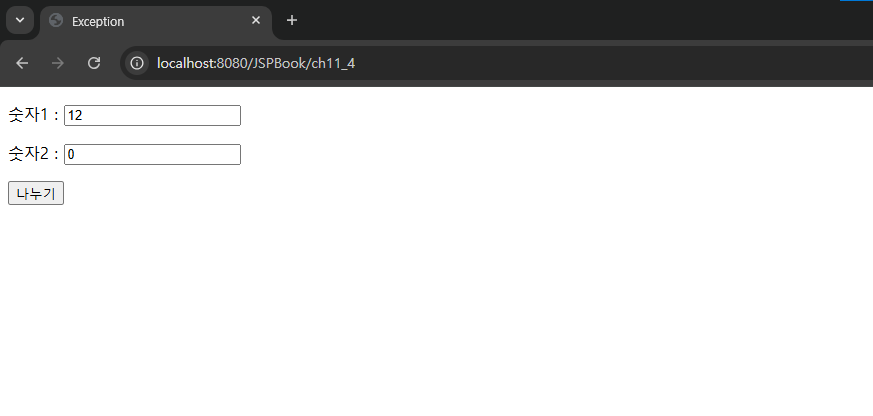
예제 11-4.web.xml 파일에 오류 코드로 오류 페이지 호출하기
JSPBook/src/main/webapp/WEB-INF/web.xml
|
<?xml version="1.0" encoding="UTF-8"?>
<!-- 미리 객체를 생성하는 파일 : 서버가 실행될때 무조건 먼저 실행된다. --> <web-app xmlns:xsi="http://www.w3.org/2001/XMLSchema-instance" xmlns="https://jakarta.ee/xml/ns/jakartaee" xsi:schemaLocation="https://jakarta.ee/xml/ns/jakartaee https://jakarta.ee/xml/ns/jakartaee/web-app_5_0.xsd" version="5.0"> <display-name>JSPBook</display-name> <welcome-file-list> <welcome-file>index.html</welcome-file> <welcome-file>index.htm</welcome-file> <welcome-file>index.jsp</welcome-file> <welcome-file>default.html</welcome-file> <welcome-file>default.htm</welcome-file> <welcome-file>default.jsp</welcome-file> </welcome-file-list> <!-- 서버에 tomcat-users.xml에 선언된 role(그룹)을 명시한다 : 인증--> <security-role> <role-name>manager</role-name> </security-role> <!-- 제약사항(권한)을 설정한다 --> <security-constraint> <!-- 웹페이지 접근권한설정 : 무엇을 보안하겠다 --> <web-resource-collection> <web-resource-name>test</web-resource-name> <!-- http://localhost:8080/JSPBook/ch10_2 --> <url-pattern>/ch10_3</url-pattern> <http-method>GET</http-method> </web-resource-collection> <!-- 누구에게 허용해주겠다. --> <auth-constraint> <role-name>manager</role-name> </auth-constraint> <!-- 인증권한시 데이터를 보호할것이냐? --> <user-data-constraint> <transport-guarantee>NONE</transport-guarantee> </user-data-constraint> </security-constraint> <!-- 인증방법 설정하기 --> <login-config> <auth-method>FORM</auth-method> <form-login-config> <form-login-page>/ch10/login.jsp</form-login-page> <form-error-page>/ch10/login_failed.jsp</form-error-page> </form-login-config> </login-config> <error-page> <error-code>500</error-code> <location>/ch11/errorCode_error.jsp</location> </error-page> </web-app> |
JSPBook/src/main/webapp/ch11/errorCode.jsp
|
<%@ page language="java" contentType="text/html; charset=UTF-8"
pageEncoding="UTF-8"%> <!DOCTYPE html> <html> <head> <meta charset="UTF-8"> <title>Exception</title> </head> <body> <form action="ch11/errorCode_process.jsp" method="post"> <p> 숫자1 : <input type="text" name="num1"> <p> 숫자2 : <input type="text" name="num2"> <p><input type="submit" value="나누기"> </form> </body> </html> |
JSPBook/src/main/webapp/ch11/errorCode_process.jsp
|
<%@ page language="java" contentType="text/html; charset=UTF-8"
pageEncoding="UTF-8"%> <!DOCTYPE html> <html> <head> <meta charset="UTF-8"> <title>Exception</title> </head> <body> <% String num1=request.getParameter("num1"); String num2=request.getParameter("num2"); int a=Integer.parseInt(num1); int b=Integer.parseInt(num2); int c=a/b; out.print(num1+" / "+num2+" = "+c); %> </body> </html> |
JSPBook/src/main/webapp/ch11/errorCode_error.jsp
|
<%@ page language="java" contentType="text/html; charset=UTF-8"
pageEncoding="UTF-8"%> <!DOCTYPE html> <html> <head> <meta charset="UTF-8"> <title>Exception</title> </head> <body> errorCode 505 오류가 발생하였습니다. </body> </html> |
실행 결과
 |
 |
2)예외 유형으로 오류 페이지 호출하기
-예외 유형에 따른 오류 페이지 호출 방법은 JSP 페이지가 발생시키는 오류가 web.xml 파일에 설정된 예외 유형과 일치하는 경우 예외 유형과 오류 페이지를 보여줌. web.xml 파일에 예외 유형과 오류 페이지를 설정하는 형식은 다음과 같음
| <error-page> <exception-type>예외 유형</exception-type> <location>오류 페이지의 URL</loacation> </error-page> |
◎주요 예외 유형의 종류
| 예외 유형 | 설명 |
| ClassNotFoundException | 클래스를 찾지 못했을 때 발생함 |
| NullPointerException | null 오브젝트로 접근했을 때 발생함 |
| ClassCastException | 변환 할 수 있는 유형으로 객체를 변환할 때 발생함 |
| OutOfMemoryException | 메모리의 부족으로 메모리를 확보하지 못했을 때 발생함 |
| StackOverflowError | 스택 오버플로일 때 발생함 |
| ArrayIndexOutOfBoundException | 범위 밖의 배열 첨자를 설정했을 때 발생함 |
| NegativeArraySizeException | 음수로 배열 크기를 설정했을 때 발생함 |
| illegalArgumentException | 부적절한 인자를 메소드에 전달할 때 발생함 |
| IOException | 입출력 처리에 문제가 있을 때 발생함 |
| NumberFormatException | 부적절한 문자열을 수치로 변환하려 할 때 발생함 |
| ArithmeticException | 어떤 값을 0으로 나누었을 때 발생함 |
예제 11-5.web.xml 파일에 예외 유형으로 오류 페이지 호출하기
JSPBook/src/main/webapp/WEB-INF/web.xml
|
<?xml version="1.0" encoding="UTF-8"?>
<!-- 미리 객체를 생성하는 파일 : 서버가 실행될때 무조건 먼저 실행된다. --> <web-app xmlns:xsi="http://www.w3.org/2001/XMLSchema-instance" xmlns="https://jakarta.ee/xml/ns/jakartaee" xsi:schemaLocation="https://jakarta.ee/xml/ns/jakartaee https://jakarta.ee/xml/ns/jakartaee/web-app_5_0.xsd" version="5.0"> <display-name>JSPBook</display-name> <welcome-file-list> <welcome-file>index.html</welcome-file> <welcome-file>index.htm</welcome-file> <welcome-file>index.jsp</welcome-file> <welcome-file>default.html</welcome-file> <welcome-file>default.htm</welcome-file> <welcome-file>default.jsp</welcome-file> </welcome-file-list> <!-- 서버에 tomcat-users.xml에 선언된 role(그룹)을 명시한다 : 인증--> <security-role> <role-name>manager</role-name> </security-role> <!-- 제약사항(권한)을 설정한다 --> <security-constraint> <!-- 웹페이지 접근권한설정 : 무엇을 보안하겠다 --> <web-resource-collection> <web-resource-name>test</web-resource-name> <!-- http://localhost:8080/JSPBook/ch10_2 --> <url-pattern>/ch10_3</url-pattern> <http-method>GET</http-method> </web-resource-collection> <!-- 누구에게 허용해주겠다. --> <auth-constraint> <role-name>manager</role-name> </auth-constraint> <!-- 인증권한시 데이터를 보호할것이냐? --> <user-data-constraint> <transport-guarantee>NONE</transport-guarantee> </user-data-constraint> </security-constraint> <!-- 인증방법 설정하기 --> <login-config> <auth-method>FORM</auth-method> <form-login-config> <form-login-page>/ch10/login.jsp</form-login-page> <form-error-page>/ch10/login_failed.jsp</form-error-page> </form-login-config> </login-config> <error-page> <exception-type>java.lang.Exception</exception-type> <location>/ch11/exceptionType_error.jsp</location> </error-page> </web-app> |
JSPBook/src/main/webapp/ch11/exceptionType.jsp
|
<%@ page language="java" contentType="text/html; charset=UTF-8"
pageEncoding="UTF-8"%> <!DOCTYPE html> <html> <head> <meta charset="UTF-8"> <title>Exception</title> </head> <body> <form action="ch11/exceptionType_process.jsp" method="post"> <p> 숫자1 : <input type="text" name="num1"> <p> 숫자2 : <input type="text" name="num2"> <p> <input type="submit" value="나누기"> </form> </body> </html> |
JSPBook/src/main/webapp/ch11/exceptionType_process.jsp
|
<%@ page language="java" contentType="text/html; charset=UTF-8"
pageEncoding="UTF-8"%> <!DOCTYPE html> <html> <head> <meta charset="UTF-8"> <title>Exception</title> </head> <body> <% String num1=request.getParameter("num1"); String num2=request.getParameter("num2"); int a=Integer.parseInt(num1); int b=Integer.parseInt(num2); int c=a/b; out.print(num1 + " / " + num2 + " = " + c); %> </body> </html> |
JSPBook/src/main/webapp/ch11/exceptionType_error.jsp
|
<%@ page language="java" contentType="text/html; charset=UTF-8"
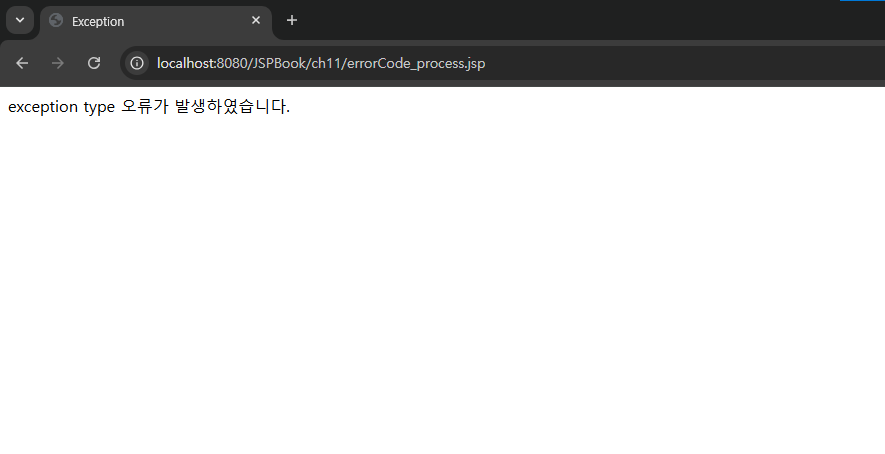
pageEncoding="UTF-8"%> <!DOCTYPE html> <html> <head> <meta charset="UTF-8"> <title>Exception</title> </head> <body> exception type 오류가 발생하였습니다. </body> </html> |
실행 결과
 |
04.try-catch-finally를 이용한 예외 처리
-try-catch-finally는 자바의 예외 처리 구분으로 스클립틀릿 태그에 작성하며 형식은 다음과 같음. try 구문에는 예외가 발생할 수 있는 코드를 작성하고, catch 구문에는 오류가 발생할 수 있는 예외 사항을 예측하여 오류를 처리하는 코드를 작성함. 그리고 finallt 구문에는 try 구문이 실행된 후 실행할 코드를 작성하는데 이는 생략할 수 있음
| try{ //예외가 발생할 수 있는 실행문 } catch(처리할 예외 유형 설정){ //예외 처리문 } [finally{ //예외와 상관없이 무조건 실행되는 문장(생략 가능) }] |
-try-catch-finally의 실행 순서를 살펴보면, 먼저 try 안에 있는 문장이 실행됨. 만약 try 블록 내 실행되는 문장 중 예외가 발생하면 실행을 중단하고, 예외와 일치하는 catch 블록의 내용을 실행함. finally 블록은 선택적으로 작성하는 부분으로, 이 블록이 존재하면 반드시 실행됨
예제 11-6.try-catch-finally를 이용하여 예외 처리하기
JSPBook/src/main/webapp/ch11/tryCatch.jsp
|
<%@ page language="java" contentType="text/html; charset=UTF-8"
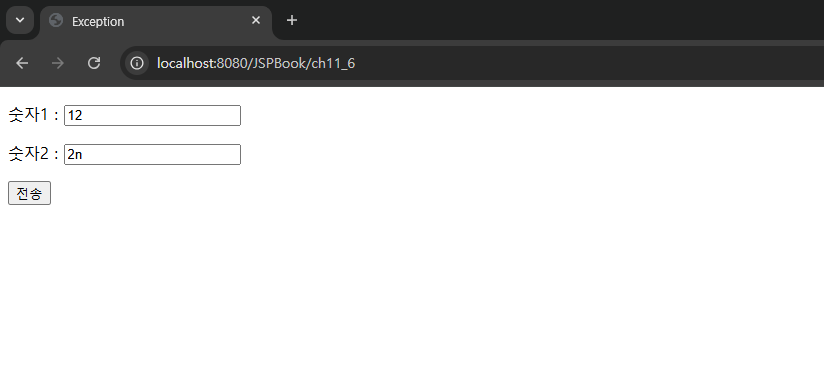
pageEncoding="UTF-8"%> <!DOCTYPE html> <html> <head> <meta charset="UTF-8"> <title>Exception</title> </head> <body> <form action="ch11/tryCatch_process.jsp" method="post"> <p> 숫자1 : <input type="text" name="num1"> <p> 숫자2 : <input type="text" name="num2"> <p> <input type="submit" value="전송"> </form> </body> </html> |
JSPBook/src/main/webapp/ch11/tryCatch_process.jsp
|
<%@ page language="java" contentType="text/html; charset=UTF-8"
pageEncoding="UTF-8"%> <!DOCTYPE html> <html> <head> <meta charset="UTF-8"> <title>Exception</title> </head> <body> <% try{ String num1=request.getParameter("num1"); String num2=request.getParameter("num2"); int a=Integer.parseInt(num1); int b=Integer.parseInt(num2); int c=a / b; }catch(NumberFormatException e){ RequestDispatcher dispatcher=request.getRequestDispatcher("tryCatch_error.jsp"); dispatcher.forward(request, response); } %> </body> </html> |
*이동: 1.forward(내부이동): URL 안바뀜
2.redirect(외부이동): 나갔다가 다시 돌아옴, URL 바뀜
*disparcher: 이동태그(request) 가져갈 수 있게 함 => 이 페이지로 가라
JSPBook/src/main/webapp/ch11/tryCatch_error.jsp
|
<%@ page language="java" contentType="text/html; charset=UTF-8"
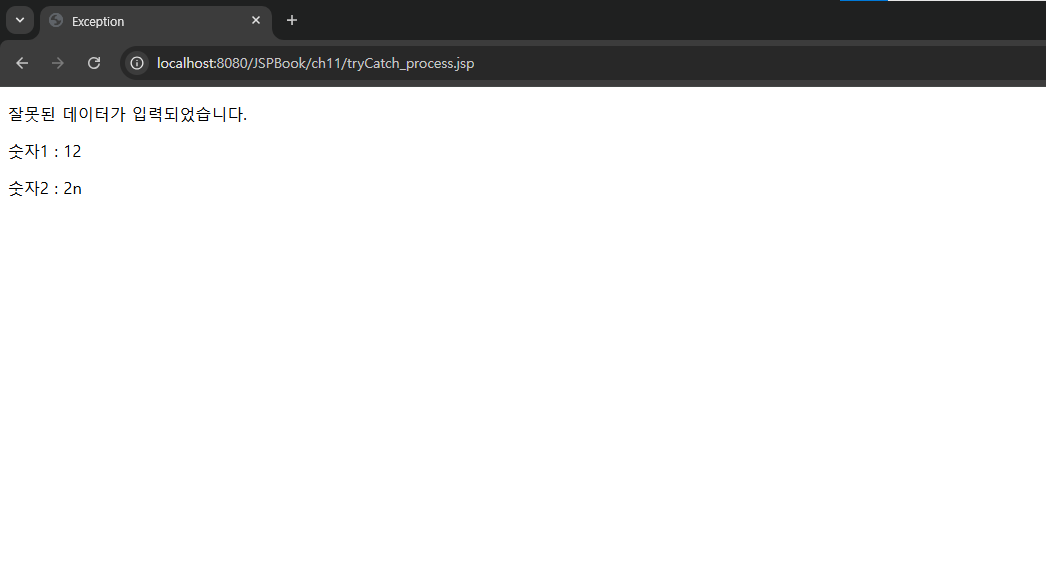
pageEncoding="UTF-8"%> <!DOCTYPE html> <html> <head> <meta charset="UTF-8"> <title>Exception</title> </head> <body> <p> 잘못된 데이터가 입력되었습니다. <p> <%=" 숫자1 : " + request.getParameter("num1") %> <p> <%=" 숫자2 : " + request.getParameter("num2") %> </body> </html> |
실행 결과
 |
 |
05.북마켓 예외 처리 페이지 만들기
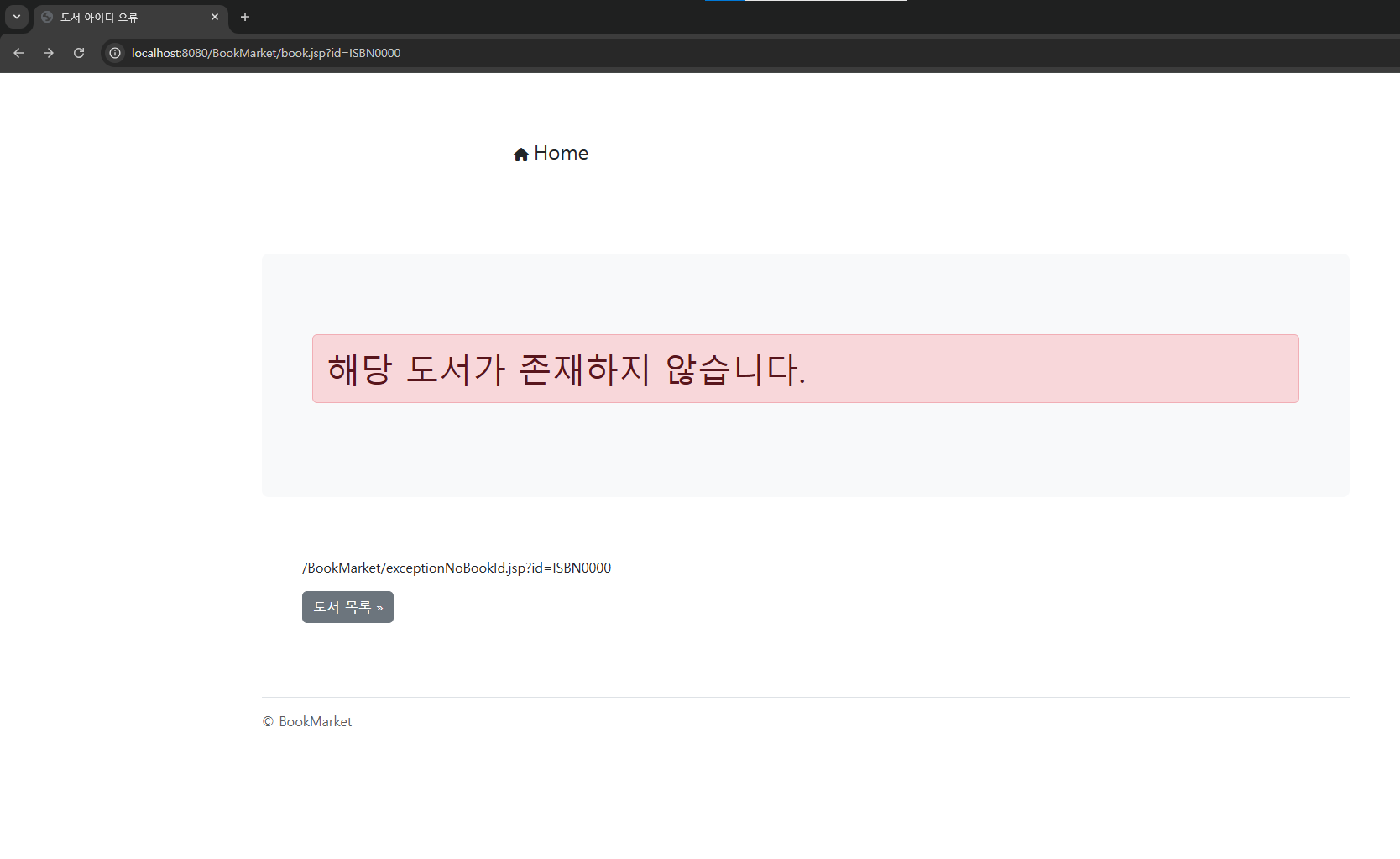
-예외 처리 방법을 적용하여 요청된 페이지나 도서 아이디가 없을 때 예외 처리를 하도록 만듬
예제 11-7.page 디렉티브 태그에 errorPage 속성을 이용하여 오류 페이지 호출하기
1)오류 페이지 작성하기
BookMarket/src/main/webapp/exceptionNoBookId.jsp
|
<%@ page language="java" contentType="text/html; charset=UTF-8"
pageEncoding="UTF-8"%> <!DOCTYPE html> <html> <head> <meta charset="UTF-8"> <script src="https://kit.fontawesome.com/fa848000d2.js" crossorigin="anonymous"></script> <link rel ="stylesheet" href ="./resources/css/bootstrap.min.css" /> <title>도서 아이디 오류</title> </head> <body> <div class="container py-4"> <%@ include file="menu.jsp" %> <div class="p-5 mb-4 bg-body-tertiary rounded-3"> <div class="container-fluid py-5"> <h1 class="alert alert-danger">해당 도서가 존재하지 않습니다.</h1> </div> </div> <div class="row align-items-md-stretch"> <div class="col-md-12"> <div class="h-100 p-5"> <p> <%=request.getRequestURI() %>?<%=request.getQueryString() %> <p> <a href="book.jsp" class="btn btn-secondary">도서 목록 »</a> </div> </div> </div> <%@ include file="footer.jsp" %> </div> </body> </html> |
2)도서 상세 보기 페이지 수정하기
BookMarket/src/main/webapp/book.jsp
|
<%@ page language="java" contentType="text/html; charset=UTF-8"
pageEncoding="UTF-8"%> <%@ page import="dto.Book" %> <%@ page import="dao.BookRepository" %> -------------------------- 추가 ------------------------------- <%@ page errorPage="exceptionNoBookId.jsp" %> <!DOCTYPE html> <html> <head> <meta charset="UTF-8"> <script src="https://kit.fontawesome.com/fa848000d2.js" crossorigin="anonymous"></script> <link rel ="stylesheet" href ="./resources/css/bootstrap.min.css" /> <title>도서 상세 정보</title> </head> <body> <div class="container py-4"> <%@ include file="menu.jsp" %> <div class="p-5 mb-4 bg-body-tertiary rounded-3"> <div class="container-fluid py-5"> <h1 class="display-5 fw-bold">도서정보</h1> <p class="col-md-8 fs-4">BookInfo</p> </div> </div> <% String id=request.getParameter("id"); BookRepository dao=BookRepository.getInstance(); Book book=dao.getBookById(id); %> <div class="row align-items-md-stretch"> <div class="col-md-5"> <img src="./resources/images/<%=book.getFilename() %>" style="width : 70%"> </div> <div class="col-md-12"> <h3><b><%=book.getName() %></b></h3> <p> <%=book.getDescription() %> <p> <b>도서코드 : </b><span class="badge text-bg-danger"> <%= book.getBookId()%></span> <p> <b>저자</b> : <%=book.getAuthor() %> <p> <b>출판사</b> : <%=book.getPublisher() %> <p> <b>출판일</b> : <%=book.getReleaseDate() %> <p> <b>분류</b> : <%=book.getCategory() %> <p> <b>재고수</b> : <%=book.getUnitsInStock() %> <h4><%=book.getUnitPrice() %>원</h4> <p> <a href="#" class="btn btn-info">도서주문 »</a> <a href=" ./books.jsp" class="btn btn-secondary" >도서 목록 »</a> </div> </div> <jsp:include page="footer.jsp" /> </div> </body> </html> |
실행 결과
 |
예제 11-8.web.xml 파일에 오류 코드로 오류 페이지 호출하기
1)web.xml 파일에 추가 작성하기
BookMarket/src/main/webapp/ WEB-INF/web.xml
|
<?xml version="1.0" encoding="UTF-8"?>
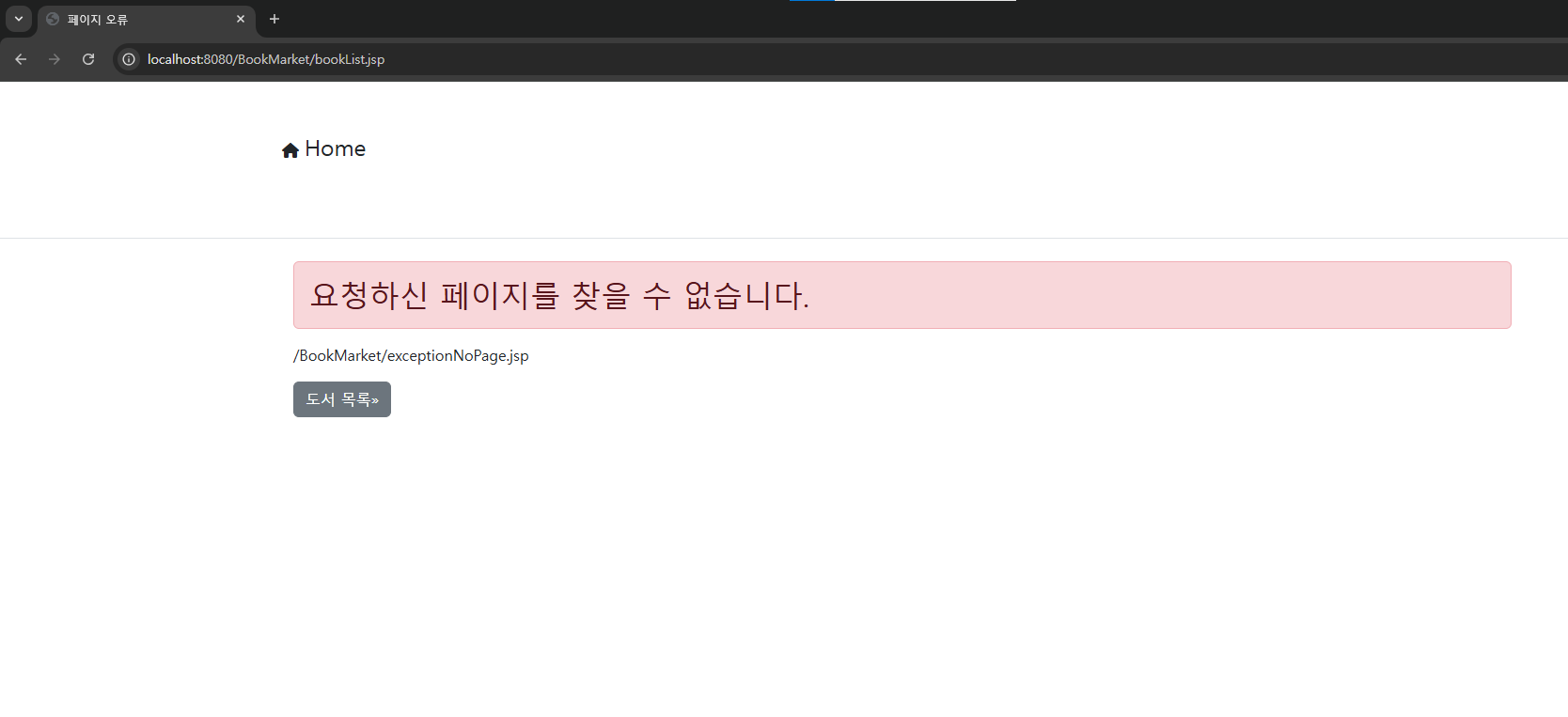
<web-app xmlns:xsi="http://www.w3.org/2001/XMLSchema-instance" xmlns="https://jakarta.ee/xml/ns/jakartaee" xsi:schemaLocation="https://jakarta.ee/xml/ns/jakartaee https://jakarta.ee/xml/ns/jakartaee/web-app_5_0.xsd" version="5.0"> <display-name>BookMarket</display-name> <welcome-file-list> <welcome-file>index.html</welcome-file> <welcome-file>index.htm</welcome-file> <welcome-file>index.jsp</welcome-file> <welcome-file>default.html</welcome-file> <welcome-file>default.htm</welcome-file> <welcome-file>default.jsp</welcome-file> </welcome-file-list> <security-role> <description></description> <role-name>manager</role-name> </security-role> <security-constraint> <display-name>BookMarket Security</display-name> <web-resource-collection> <web-resource-name>BookMarket</web-resource-name> <description></description> <url-pattern>/addBook.jsp</url-pattern> </web-resource-collection> <auth-constraint> <description>관한 관리자명</description> <role-name>manager</role-name> </auth-constraint> </security-constraint> <login-config> <auth-method>FORM</auth-method> <form-login-config> <form-login-page>/login.jsp</form-login-page> <form-error-page>/login_failed.jsp</form-error-page> </form-login-config> </login-config> <error-page> <error-code>404</error-code> <location>/exceptionNoPage.jsp</location> </error-page> </web-app> |
2)오류 페이지 작성하기
BookMarket/src/main/webapp/exceptionNoPage.jsp
|
<%@ page language="java" contentType="text/html; charset=UTF-8"
pageEncoding="UTF-8"%> <!DOCTYPE html> <html> <head> <meta charset="UTF-8"> <script src="https://kit.fontawesome.com/fa848000d2.js" crossorigin="anonymous"></script> <link rel ="stylesheet" href ="./resources/css/bootstrap.min.css" /> <title>페이지 오류</title> </head> <body> <jsp:include page="menu.jsp" /> <div class="jumbotron"> <div class="container"> <h2 class="alert alert-danger">요청하신 페이지를 찾을 수 없습니다.</h2> </div> </div> <div class="container"> <p><%=request.getRequestURI() %> <p> <a href="book.jsp" class="btn btn-secondary">도서 목록»</a> </div> </body> </html> |
실행 결과
 |
chapter 12 필터: 로그 기록하기
01.필터의 개요
-필터(filter)는 클라이언트와 서버 사이에서 request와 response 객체를 먼저 받아 사전/사후 작업 등 공통적으로 필요한 부분을 처리하는 것을 말함. 필터는 클라이언트의 요청이 웹 서버의 서블릿, JSP, HTML 페이지 같은 정적 리소스에 도달하기 전과, 반대로 정적 리소스에서 클라이언트 응답하기 전에 필요한 전처리를 가능하게 함
-필터는 HTTP 요청과 응답을 변경할 수 있는 코드로 재사용이 가능함. 한편 클라이언트와 정적 리소스 사이에 여러 개의 필터로 이루어진 필터 체인을 제공하기도 함
-이처럼 웹 애플리케이션에 필터 기능을 제공하기 위해 Filter 인터페이스를 구현하는 자바 클래스를 생성하고, 생성된 자바 클래스를 web.xml 파일에 등록함
◎필터의 기능
| 필터 | 기능 |
| Request 필터 (데이터가 들어올 때) |
-인증(사용자 인증) ex)security -요청 정보를 로그 파일로 작성 ex)일기, console, 파일 -암호화된 인코딩 작업 (잘 안함) |
| Response 필터 (데이터가 나갈 때) |
-응답 결과 데이터 압축 -응답 결과에 내용 추가/수정 (多사용) -총 서비스 시간 측정 |
02.Filter 인터페이스의 구현 클래스
-Filter 인터페이스는 필터 기능을 구현하는 데 핵심적인 역할을 함. 클라이언트와 서버의 리소스 사이에 위치한 필터의 기능을 제공하기 위해 자바 클래스로 구현해야 하며 형식은 다음과 같음. 또한 자바 클래스로 구현할 때 패키지 jakarta.servlet.Filter를 임포트해야 함
| import jakarta.servlet.*; public class 클래스 이름 implements Filter { ··· (생략) ··· } |
-Filter 인터페이스는 다음과 같은 메소드를 가지고 있음
◎Filter 인터페이스 메소드의 종류
| 메소드 | 설명 |
| init() | 필터 인스턴스의 초기화 메소드임 |
| doFilter() | 필터 기능을 작성하는 메소드임 |
| destroy() | 인스턴스의 종료 전에 호출되는 메소드임 |
1)init() 메소드: 준비
-init() 메소드는 JSP 컨테이너가 필터를 초기화 할 때 호출되는 메소드로, 형식은 다음과 같음
| public void init(FilterConfig filterConfig) throws ServlertException |
-init() 메소드는 JSP 컨테이너 내에서 초기화 작업을 수행할 필터 인스턴스를 생성한 후 한 번만 호출됨. init() 메소드는 JSP 컨테이너에 의해 호출되어 필터의 서비스가 시작되고 있음을 나타냄
-여기서 매개변수 FilterConfig 객체는 컨테이너가 초기화 중 필터에 정보를 전달하는 데 사용하는 필터 구성 객체이며 다음과 같은 메소드를 지원함
◎FilterConfig 인터페이스 메소드의 종류
| 메소드 | 반환 유형 | 설명 |
| getFilterName() | String | web.xml 파일에 설정된 필터 이름을 반환함 |
| getInitParameter(Stringname) key |
String | web.xml 파일에 설정된 매개변수에 대한 매개변수 값을 반환함. 초기화 매개변수가 존재하지 않으면 null을 반환함(web.xml과 연결) |
| getInitParameterNames() keys=value |
Enumeration<String> | web.xml 파일에 설정된 모든 매개변수 이름을 포함하는 Enumeration 객체 타입을 반환함. 포기화 매개변수가 존재하지 않으면 비어 있는 Enumeration을 반환함 |
| getServletContext() | ServletContext | ServletContext 객체를 반환함 |
2)doFilter() 메소드
-doFilter() 메소드는 JSP 컨테이너가 필터를 리소스에 적용할 때마다 호출되는 메소드로 형식은 다음과 같음. doFilter() 메소드는 init() 메소드 후에 호출되며, 필터가 어떤 기능을 수행할 필요가 있을 때마다 호출됨
| public void doFilter(ServletRequest request, ServletResponse response, FilterChain filterChain) throws IOException, ServletException |
-첫 번째 매개변수 ServletRequest 객체는 체인을 따라 전달하는 요청이고, 두 번째 매개변수 ServletResponse 객체는 체인을 따라 전달할 응답임. 세 번째 매개변수 FilterChain 객체는 체인에서 다음 필터를 호출하는데 사용되는데, 만약 호출 필터가 체인의 마지막 필터이면 체인의 끝에서 리소스를 호출함
-필터는 연속된 체인을 따라 다음에 존재하는 필터로 이동하며 연속적으로 수행함. 이때 수행해야 할 필터 객체는 doFilter() 메소드의 매개변수 FilterChain 객체로 전달됨. FilterChain 객체는 동기화를 위해서도 존재하기만 필터의 수행 과정을 연속적으로 하는 방법으로도 사용됨. FilterChain 객체는 다음과 같이 하나의 메소드만 지원함
◎FilterChain 인터페이스 메소드의 종류
| 메소드 | 반환 유형 | 설명 |
| doFilter(ServletRequest request, ServletResponse response) | void | 체인의 다음 필터 또는 리소스로 제어를 전달함 |
-필터는 한 번만 수행되는 것이 아니라 요청을 받았을 때 수행되고 filterChain.dofilter()를 통해 다음 부분으로 넘겨주며, 다음 부분이 모두 수행되면 다시 필터로 완전한 응답 객체와 함께 제어권이 넘어옴. 따라서 filterChain.doFilter() 메소드를 기준으로 전처리, 후처리 부분으로 나뉨
3)destroy() 메소드: 정리
-destro() 메소드는 필터 인스턴스를 종료하기 전에 호출하는 메소드로, 형식은 다음과 같음. JSP 컨테이너가 필터 인스턴스를 삭제하기 전에 청소 작업을 수행하는 데 사용되며, 이는 필터로 열린 리소스를 모두 닫을 수 있는 방법임. destroy() 메소드는 필터의 수명 동안 한 번만 호출됨
| public void destroy() |
03 web.xml 파일의 필터 구성: 앞의 (클래스 implement Filter)의 객체생성 -> init(), doFilter(), destroy()
-필터를 사용하려면 어떤 필터가 어떤 리소스에 대해 적용되는지 JSP 컨테이너에 알려주어야함. 이는 웹 애플리케이션의 /WEB-INF/ 폴더에 존재하는 web.xml 파일을 통해 이루어지므로 web.xml 파일에 필터를 설정함
-web.xml 파일에 필터를 설정할 때는 <filter>와 <filter-mapping> 요소를 사용하며, 형식은 다음과 같음. web.xml 파일에 여러 개의 필터가 설정되어 있으면 선언된 순서대로 실행됨
| <filter> -> 무엇을(어떤 객체) <filter-name> a··· </filter-name> : 참조변수 <filter-class> ··· </filter-class> <init-param> =>객체 생성 New Filter( ) <param-name> ··· </param-name> : key <param-value> ··· </param-value> : value </init-param> </filter> <filter-mapping> -> 언제 ->실행 시점 <filter-name> a··· </filter-name> : 이름 같아야 함 <url-pattern> ··· </url-pattern> ->URL 이 매칭 될 때: 특정요청이 실행될 때 이 클래스를 실행함 </filter-mapping> |
◎<filter>를 구성하는 하위 요소
| 요소 | 설명 |
| <filter-name> | 필터 이름을 설정함 |
| <filter-class> | 자바 클래스 이름을 설정함 |
| <filter-param> | 매개변수와 값을 설정함 |
◎<filter-mapping>을 구성하는 하위 요소
| 요소 | 설명 |
| <filter-name> | 필터 이름을 설정함 |
| <filter-pattern> | URL 패턴을 설정함 |
1)<filter> 요소
-<filter> 요소는 웹 애플리케이션에서 자바 필터와 매개변수를 설정하는 데 사용하며 형식은 다음과 같음
| <filter> <filter-name>필터 이름</filter-name> <filter-class>클래스 이름</filter-class> [<init-param> <param-name>매개변수 이름</param-name> : test key=value <param-value>매개변수 값</param-value> : 안녕 cf)test=안녕 </init-param>] : 생략가능 </filter> |
-<init-param> 요소에 설정된 매개변수와 값을 자바 또는 JSP 코드에서 접근하는 형식은 다음과 같음
| String value=getServletConfig().getInitParameter("매개변수 이름"); |
*getServletConfig(): .xml 필터 연결
2)<filter-mapping> 요소
-<filter-mapping> 요소눈 특정 리소스에 대해 어떤 필터를 사용할지 설정하는 데 사용하며 형식은 다음과 같음
| <filter-mapping> <filter-name>필터 이름</filter-name> <url-pattern>요청 URL 패턴</url-pattern> </filter-mapping> |
◎요청 URL 패턴의 유형
-<url-pattern> 요소에 설정할 수 있는요청 URL 패턴의 유형은 다음과 같음
·/로 시작하고 /*로 끝나는 url-pattern은 경로 매핑에 사용됨
·*로 시작하는 url-pattern은 확장자에 대한 매핑을 할 때 사용됨
·나머지 다른 문자열은 정확한 매핑을 하는 데 사용됨
-다음은 요청 URL 패턴의 예임
| URL 패턴 | 설명 |
| *.do | .do로 끝나는 모든 URL과 일치하는 파일 확인 패턴 |
| /BookMarket/* | /BookMarket/으로 시작하는 모든 URL과 일치하는 경로 패턴 |
| /MyFilter.jsp | /MyFilter.jsp로만 일치하는 특정 패턴 |
| /BookMarket/cart.jsp | /BookMarket/cart.jsp로만 일치하는 특정 패턴 |
*.확장자: 옵션, '성' 같은 것 -> 아무거나 상관x => 수동연결 프로그램
* /*
webapp any: 어떤 문자열이든 상관x
예제 12-1.폼 페이지에서 전송된 요청 파라미터를 필터로 처리하기
JSPBook/src/main/java/ch12/AuthenFilter.java
|
package controller.ch12;
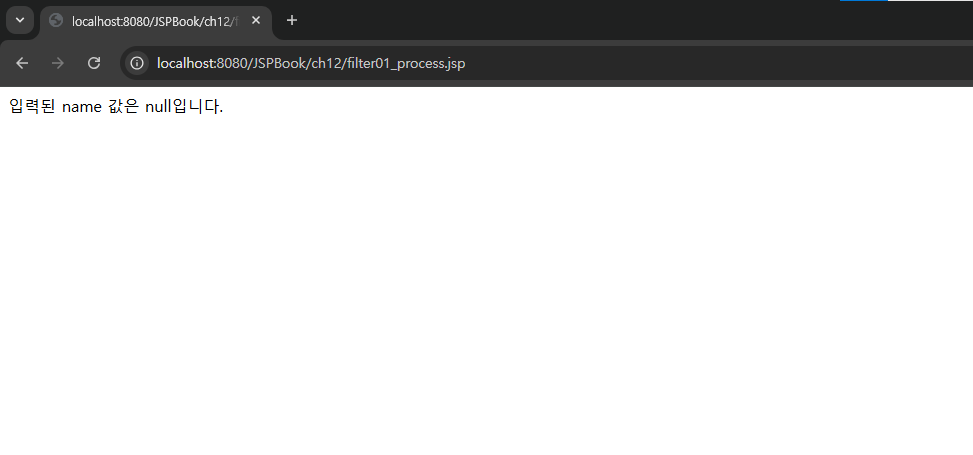
import java.io.IOException; import java.io.PrintWriter; import jakarta.servlet.Filter; import jakarta.servlet.FilterChain; import jakarta.servlet.FilterConfig; import jakarta.servlet.ServletException; import jakarta.servlet.ServletRequest; import jakarta.servlet.ServletResponse; public class AuthenFilter implements Filter{ @Override public void init(FilterConfig filterConfig) throws ServletException { System.out.println("Filter01 초기화..."); } @Override public void doFilter(ServletRequest request, ServletResponse response, FilterChain filterChain) throws IOException, ServletException { System.out.println("Filter01.jsp 수행..."); String name=request.getParameter("name"); if(name==null||name.equals("")){ response.setCharacterEncoding("UTF-8"); response.setContentType("text/html; charset=UTF-8"); PrintWriter writer=response.getWriter(); String message="입력된 name 값은 null입니다."; writer.println(message); return; } filterChain.doFilter(request, response); } @Override public void destroy() { System.out.println("Filter01 해제..."); } } |
JSPBook/src/main/webapp/WEB-INF/web.xml
|
<?xml version="1.0" encoding="UTF-8"?>
<!-- 미리 객체를 생성하는 파일 : 서버가 실행될때 무조건 먼저 실행된다. --> <web-app xmlns:xsi="http://www.w3.org/2001/XMLSchema-instance" xmlns="https://jakarta.ee/xml/ns/jakartaee" xsi:schemaLocation="https://jakarta.ee/xml/ns/jakartaee https://jakarta.ee/xml/ns/jakartaee/web-app_5_0.xsd" version="5.0"> <display-name>JSPBook</display-name> <welcome-file-list> <welcome-file>index.html</welcome-file> <welcome-file>index.htm</welcome-file> <welcome-file>index.jsp</welcome-file> <welcome-file>default.html</welcome-file> <welcome-file>default.htm</welcome-file> <welcome-file>default.jsp</welcome-file> </welcome-file-list> <!-- 서버에 tomcat-users.xml에 선언된 role(그룹)을 명시한다 : 인증--> <security-role> <role-name>manager</role-name> </security-role> <!-- 제약사항(권한)을 설정한다 --> <security-constraint> <!-- 웹페이지 접근권한설정 : 무엇을 보안하겠다 --> <web-resource-collection> <web-resource-name>test</web-resource-name> <!-- http://localhost:8080/JSPBook/ch10_2 --> <url-pattern>/ch10_3</url-pattern> <http-method>GET</http-method> </web-resource-collection> <!-- 누구에게 허용해주겠다. --> <auth-constraint> <role-name>manager</role-name> </auth-constraint> <!-- 인증권한시 데이터를 보호할것이냐? --> <user-data-constraint> <transport-guarantee>NONE</transport-guarantee> </user-data-constraint> </security-constraint> <!-- 인증방법 설정하기 --> <login-config> <auth-method>FORM</auth-method> <form-login-config> <form-login-page>/ch10/login.jsp</form-login-page> <form-error-page>/ch10/login_failed.jsp</form-error-page> </form-login-config> </login-config> <!-- <error-page> <error-code>500</error-code> <location>/ch11/errorCode_error.jsp</location> </error-page> --> <!-- <error-page> <exception-type>java.lang.Exception</exception-type> <location>/ch11/exceptionType_error.jsp</location> </error-page> --> <filter> <filter-name>Filter01</filter-name> <filter-class>controller.ch12.AuthenFilter</filter-class> </filter> <filter-mapping> <filter-name>Filter01</filter-name> <url-pattern>/ch12/filter01_process.jsp</url-pattern> </filter-mapping> </web-app> |
JSPBook/src/main/webapp/ch12/filter01.jsp
|
<%@ page language="java" contentType="text/html; charset=UTF-8"
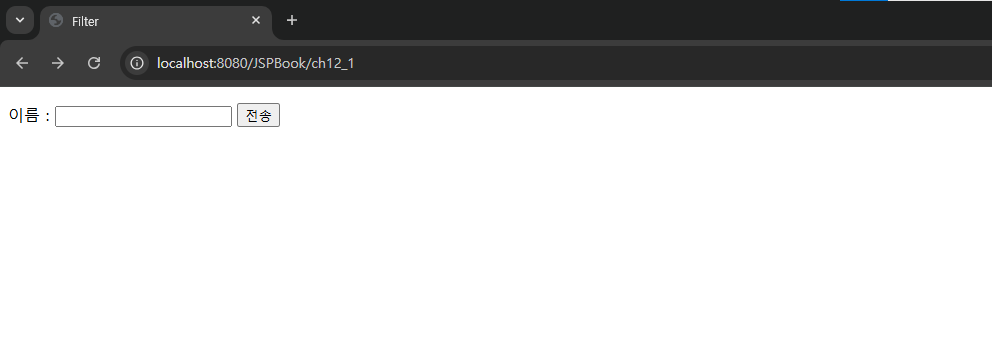
pageEncoding="UTF-8"%> <!DOCTYPE html> <html> <head> <meta charset="UTF-8"> <title>Filter</title> </head> <body> <form method="post" action="ch12/filter01_process.jsp"> <p> 이름 : <input type="text" name="name"> <input type="submit" value="전송"> </form> </body> </html> |
JSPBook/src/main/webapp/ch12/filter01_process.jsp
|
<%@ page language="java" contentType="text/html; charset=UTF-8"
pageEncoding="UTF-8"%> <!DOCTYPE html> <html> <head> <meta charset="UTF-8"> <title>Filter</title> </head> <body> <% String name=request.getParameter("name"); %> <p> 입력된 name 값 :<%=name %> </body> </html> |
실행 결과
 |
 |
 |
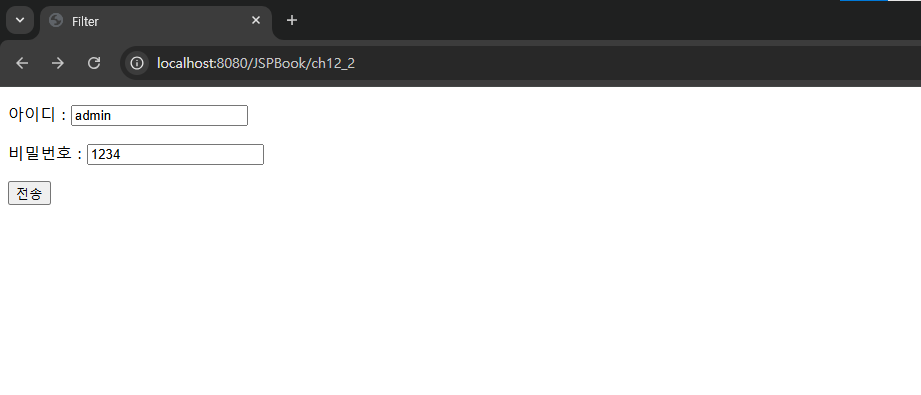
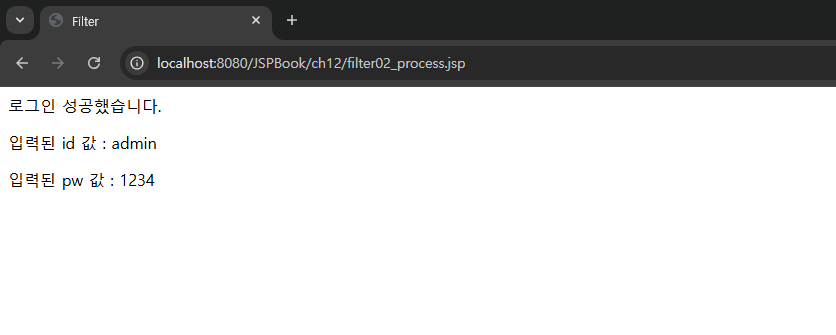
예제 12-2.필터 처리로 매개변수와 값을 전달받아 로그인 인증 처리하기
JSPBook/src/main/java/ch12/InitParamFilter.java
|
package controller.ch12;
import java.io.IOException; import java.io.PrintWriter; import jakarta.servlet.Filter; import jakarta.servlet.FilterChain; import jakarta.servlet.FilterConfig; import jakarta.servlet.ServletException; import jakarta.servlet.ServletRequest; import jakarta.servlet.ServletResponse; public class InitParamFilter implements Filter{ private FilterConfig filterConfig=null; @Override public void init(FilterConfig filterConfig) throws ServletException { System.out.println("Filter02 초기화..."); this.filterConfig=filterConfig; } @Override public void doFilter(ServletRequest request, ServletResponse response, FilterChain filterChain) throws IOException, ServletException { System.out.println("Filter02 수행..."); String id=request.getParameter("id"); String passwd=request.getParameter("passwd"); String param1=filterConfig.getInitParameter("param1"); //매핑 String param2=filterConfig.getInitParameter("param2"); String message; response.setCharacterEncoding("UTF-8"); response.setContentType("text/html; charset=UTF-8"); PrintWriter writer=response.getWriter(); if(id.equals(param1)&&passwd.equals(param2)) message="로그인 성공했습니다."; else message="로그인 실패했습니다."; writer.println(message); filterChain.doFilter(request, response); } @Override public void destroy() { System.out.println("Filter02 해제..."); } } |
JSPBook/src/main/webapp/WEB-INF/web.xml
|
<?xml version="1.0" encoding="UTF-8"?>
<!-- 미리 객체를 생성하는 파일 : 서버가 실행될때 무조건 먼저 실행된다. --> <web-app xmlns:xsi="http://www.w3.org/2001/XMLSchema-instance" xmlns="https://jakarta.ee/xml/ns/jakartaee" xsi:schemaLocation="https://jakarta.ee/xml/ns/jakartaee https://jakarta.ee/xml/ns/jakartaee/web-app_5_0.xsd" version="5.0"> <display-name>JSPBook</display-name> <welcome-file-list> <welcome-file>index.html</welcome-file> <welcome-file>index.htm</welcome-file> <welcome-file>index.jsp</welcome-file> <welcome-file>default.html</welcome-file> <welcome-file>default.htm</welcome-file> <welcome-file>default.jsp</welcome-file> </welcome-file-list> <!-- 서버에 tomcat-users.xml에 선언된 role(그룹)을 명시한다 : 인증--> <security-role> <role-name>manager</role-name> </security-role> <!-- 제약사항(권한)을 설정한다 --> <security-constraint> <!-- 웹페이지 접근권한설정 : 무엇을 보안하겠다 --> <web-resource-collection> <web-resource-name>test</web-resource-name> <!-- http://localhost:8080/JSPBook/ch10_2 --> <url-pattern>/ch10_3</url-pattern> <http-method>GET</http-method> </web-resource-collection> <!-- 누구에게 허용해주겠다. --> <auth-constraint> <role-name>manager</role-name> </auth-constraint> <!-- 인증권한시 데이터를 보호할것이냐? --> <user-data-constraint> <transport-guarantee>NONE</transport-guarantee> </user-data-constraint> </security-constraint> <!-- 인증방법 설정하기 --> <login-config> <auth-method>FORM</auth-method> <form-login-config> <form-login-page>/ch10/login.jsp</form-login-page> <form-error-page>/ch10/login_failed.jsp</form-error-page> </form-login-config> </login-config> <!-- <error-page> <error-code>500</error-code> <location>/ch11/errorCode_error.jsp</location> </error-page> --> <!-- <error-page> <exception-type>java.lang.Exception</exception-type> <location>/ch11/exceptionType_error.jsp</location> </error-page> --> <filter> <filter-name>Filter02</filter-name> <filter-class>controller.ch12.InitParamFilter</filter-class> <init-param> <param-name>param1</param-name> <!-- 파라미터 1) <param-value>admin</param-value> </init-param> <init-param> <param-name>param2</param-name> 파라미터 2) --> <param-value>1234</param-value> </init-param> </filter> <filter-mapping> <filter-name>Filter02</filter-name> <url-pattern>/ch12/filter02_process.jsp</url-pattern> </filter-mapping> <!-- <servlet> <servlet-name>webservlet</servlet-name> <servlet-class>controller.ch12.ch12_1_controller</servlet-class> </servlet> <servlet-mapping> <servlet-name>webservlet</servlet-name> <url-pattern>/ch12_1</url-pattern> </servlet-mapping> --> </web-app> |
JSPBook/src/main/webapp/ch12/filter02.jsp
|
<%@ page language="java" contentType="text/html; charset=UTF-8"
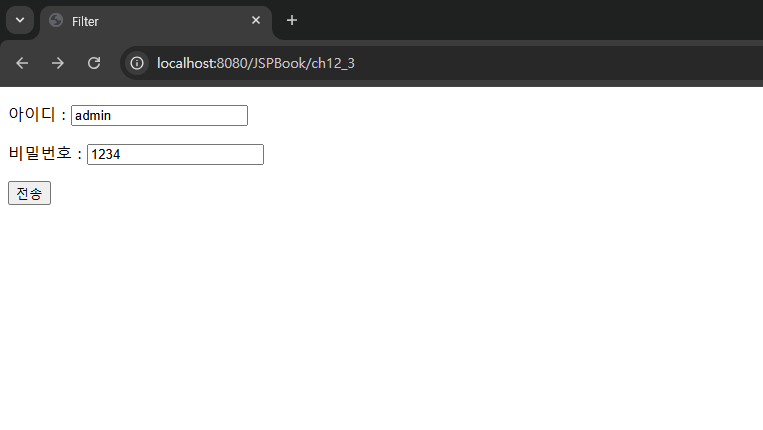
pageEncoding="UTF-8"%> <!DOCTYPE html> <html> <head> <meta charset="UTF-8"> <title>Filter</title> </head> <body> <form method="post" action="ch12/filter02_process.jsp"> <p> 아이디 : <input type="text" name="id"> <p> 비밀번호 : <input type="text" name="passwd"> <p> <input type="submit" value="전송"> </form> </body> </html> |
JSPBook/src/main/webapp/ch12/filter02_process.jsp
|
<%@ page language="java" contentType="text/html; charset=UTF-8"
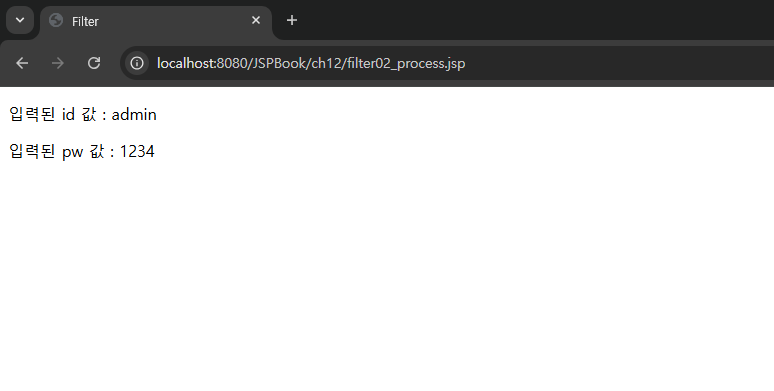
pageEncoding="UTF-8"%> <!DOCTYPE html> <html> <head> <meta charset="UTF-8"> <title>Filter</title> </head> <body> <% String id=request.getParameter("id"); String passwd=request.getParameter("passwd"); %> <p> 입력된 id 값 : <%=id %> <p> 입력된 pw 값 : <%=passwd %> </body> </html> |
실행 결과
 |
 |
 |
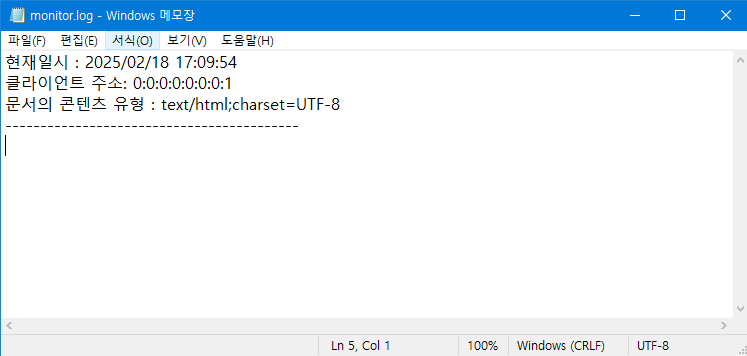
예제 12-3.[예제 12-2]의 웹 페이지를 이용하여 필터로 로그 기록하기
JSPBook/src/main/java/ch12/LogFileFilter.java
|
package controller.ch12;
import java.util.*; import java.io.FileWriter; import java.io.IOException; import java.io.PrintWriter; import java.text.DateFormat; import java.text.SimpleDateFormat; import jakarta.servlet.Filter; import jakarta.servlet.FilterChain; import jakarta.servlet.FilterConfig; import jakarta.servlet.ServletException; import jakarta.servlet.ServletRequest; import jakarta.servlet.ServletResponse; public class LogFileFilter implements Filter{ PrintWriter writer; @Override public void init(FilterConfig filterConfig) throws ServletException { String filename=filterConfig.getInitParameter("filename"); //파일경로 -> ("값") if(filename==null) throw new ServletException("로그 파일의 이름을 찾을 수 없습니다."); try { writer=new PrintWriter(new FileWriter(filename, true), true); //전역변수 } catch (IOException e) { throw new ServletException("로그 파일을 열 수 없습니다."); } } @Override public void doFilter(ServletRequest request, ServletResponse response, FilterChain filterChain) throws IOException, ServletException { writer.printf("현재일시 : %s %n", getCurrentTime()); String clientAddr=request.getRemoteAddr(); writer.printf("클라이언트 주소: %s %n", clientAddr); filterChain.doFilter(request, response); String contentType=response.getContentType(); writer.printf("문서의 콘텐츠 유형 : %s %n", contentType); writer.println("------------------------------------------"); } @Override public void destroy() { writer.close(); } private String getCurrentTime() { DateFormat formatter=new SimpleDateFormat("yyyy/MM/dd HH:mm:ss"); Calendar calendar=Calendar.getInstance(); calendar.setTimeInMillis(System.currentTimeMillis()); return formatter.format(calendar.getTime()); } } |
JSPBook/src/main/webapp/WEB-INF/web.xml
|
<?xml version="1.0" encoding="UTF-8"?>
<!-- 미리 객체를 생성하는 파일 : 서버가 실행될때 무조건 먼저 실행된다. --> <web-app xmlns:xsi="http://www.w3.org/2001/XMLSchema-instance" xmlns="https://jakarta.ee/xml/ns/jakartaee" xsi:schemaLocation="https://jakarta.ee/xml/ns/jakartaee https://jakarta.ee/xml/ns/jakartaee/web-app_5_0.xsd" version="5.0"> <display-name>JSPBook</display-name> <welcome-file-list> <welcome-file>index.html</welcome-file> <welcome-file>index.htm</welcome-file> <welcome-file>index.jsp</welcome-file> <welcome-file>default.html</welcome-file> <welcome-file>default.htm</welcome-file> <welcome-file>default.jsp</welcome-file> </welcome-file-list> <!-- 서버에 tomcat-users.xml에 선언된 role(그룹)을 명시한다 : 인증--> <security-role> <role-name>manager</role-name> </security-role> <!-- 제약사항(권한)을 설정한다 --> <security-constraint> <!-- 웹페이지 접근권한설정 : 무엇을 보안하겠다 --> <web-resource-collection> <web-resource-name>test</web-resource-name> <!-- http://localhost:8080/JSPBook/ch10_2 --> <url-pattern>/ch10_3</url-pattern> <http-method>GET</http-method> </web-resource-collection> <!-- 누구에게 허용해주겠다. --> <auth-constraint> <role-name>manager</role-name> </auth-constraint> <!-- 인증권한시 데이터를 보호할것이냐? --> <user-data-constraint> <transport-guarantee>NONE</transport-guarantee> </user-data-constraint> </security-constraint> <!-- 인증방법 설정하기 --> <login-config> <auth-method>FORM</auth-method> <form-login-config> <form-login-page>/ch10/login.jsp</form-login-page> <form-error-page>/ch10/login_failed.jsp</form-error-page> </form-login-config> </login-config> <!-- <error-page> <error-code>500</error-code> <location>/ch11/errorCode_error.jsp</location> </error-page> --> <!-- <error-page> <exception-type>java.lang.Exception</exception-type> <location>/ch11/exceptionType_error.jsp</location> </error-page> --> <filter> <filter-name>Filter02_2</filter-name> <filter-class>controller.ch12.LogFileFilter</filter-class> <init-param> <param-name>filename</param-name> <param-value>c:\\logs\\monitor.log</param-value> <!-- 파일 생성 --> </init-param> </filter> <filter-mapping> <filter-name>Filter02_2</filter-name> <url-pattern>/ch12/filter02_process.jsp</url-pattern> </filter-mapping> <!-- <servlet> <servlet-name>webservlet</servlet-name> <servlet-class>controller.ch12.ch12_1_controller</servlet-class> </servlet> <servlet-mapping> <servlet-name>webservlet</servlet-name> <url-pattern>/ch12_1</url-pattern> </servlet-mapping> --> </web-app> |
실행 결과
 |
 |
 |
'벡엔드 웹프로그래밍 > JSP' 카테고리의 다른 글
| JSP 웹프로그래밍 67일차 (25/2/20) (2) | 2025.02.20 |
|---|---|
| JSP 웹프로그래밍 66일차 (25/2/19) (0) | 2025.02.19 |
| JSP 웹프로그래밍 64일차 (25/2/17) (0) | 2025.02.17 |
| JSP 웹프로그래밍 63일차 (25/2/14) (0) | 2025.02.14 |
| JSP 웹프로그래밍 62일차 (25/2/13) (0) | 2025.02.13 |